DeathStar is a Python script that uses Empire’s RESTful API to automate gaining Domain Admin rights in Active Directory environments using a variety of techinques.
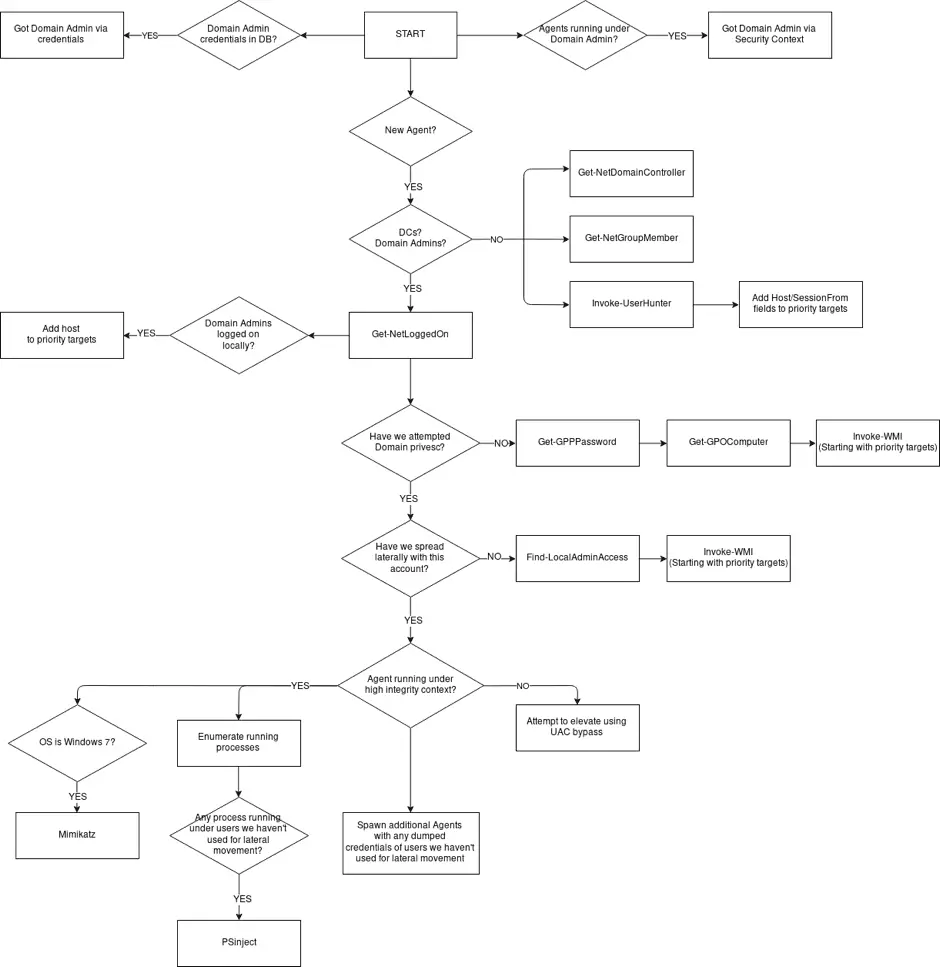
The following picture can be a good explanation of DeathStar’s operating mechanism:
Installation
git clone https://github.com/byt3bl33d3r/Empire
cd Empire/setup && ./install.sh && cd ..
# Start the Empire console and RESTful API
python empire --rest --username empireadmin --password Password123
git clone https://github.com/byt3bl33d3r/DeathStar
# Death Star is written in Python3
pip3 install -r requirements.txt
./DeathStar.py
Usage
Run DeathStar
Get an Empire Agent on a box connected to a Domain
Go grab a coffee/tea/redbull, DeathStar will take care of everything else 😉
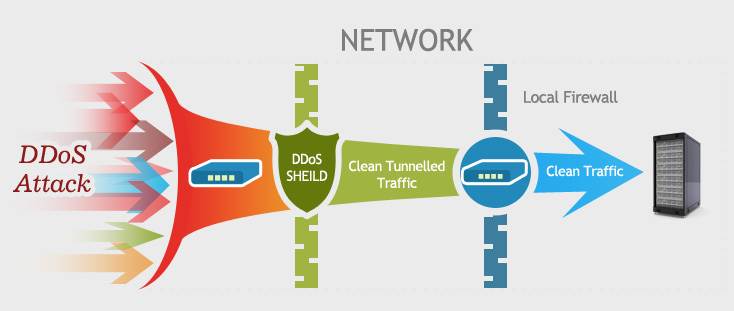
On this post, i am going to describes the 15 things against DDoS
attacks, DDoS attacks mainly to two categories: bandwidth exhaustion
attacks and resource exhaustion attacks, in order to effectively curb
these two types of attacks, you can follow the steps listed in this
article.
To
combat DDoS (distributed denial of service) attacks, you need to have a
clear understanding of what happened on the attack. Simply put, DDoS
attacks through the use of server vulnerabilities, or resources (such as
memory, hard disk consumption on the server etc.) to achieve the
purpose. Tou can follow the steps listed below to do:
If only
a few computers are the source of the attack and you have identified
the IP addresses for those sources, you place an ACL (access control
list) on the firewall server to block these access from those IPs. If
possible, change the IP address of the web server for a period of time,
but if the attacker resolves your newly configured IP by querying your
DNS server, this is no longer valid.
If you are sure that the
attack comes from a particular country, consider blocking the IP from
that country, at least for a while.
Monitoring the incoming
network traffic. In this way you can know who is visiting your network
and can monitor the exception to the visitor, which can analyze the log
and source IP afterwards. Before a large-scale attack, an attacker could
use a small number of attacks to test the robustness of your network.
The most effective (and expensive) solution for bandwidth-consuming attacks is to buy more bandwidth.
You can also use high-performance load balancing software, the use of multiple servers, and deployed in different data centers.
The use of load balancing for web and other resources, while also using the same strategy to protect DNS.
Optimize
the use of resources to improve web server load capacity. For example,
the use of apache can install apachebooster plug-in, the plug-in and
varnish and nginx integration, you can deal with the sudden increase in
traffic and memory footprint.
The use of highly scalable DNS
devices to protect DDOS attacks against DNS. Consider the commercial
solution for Cloudflare, which can provide DDOS attack protection for
DNS or TCP/IP from layer 3 to layer 7.
Enable the router or
firewall anti-IP spoofing function. CISCO ASA firewall in the
configuration of the function than in the router more convenient. Enable
this feature in ASDM (Cisco Adaptive Security Device Manager) by
clicking “Firewall” in “Configuration”, finding “anti-spoofing” and
clicking Enable. You can also use the ACL (access control list) in the
router to prevent IP spoofing, first for the network to create ACL, and
then applied to the Internet interface.
The use of third-party
services to protect your site. There are many companies have such
services, providing high-performance basic network facilities to help
you resist denial of service attacks. You only need to pay hundreds of
dollars a month on the line.
Pay attention to the security configuration of the server, to avoid resource exhaustion DDOS attacks.
Listen to the views of experts, for the attack in advance to respond to the emergency program.
Monitoring
the network and web traffic. If it is possible to configure multiple
analysis tools, such as Statcounter and Google analytics, you can more
visually understand the pattern of traffic changes and get more
information from it.
To protect DNS to avoid DNS amplification attacks.
Disable
ICMP on the router. Open ICMP only when testing is required. The
following strategies are also considered when configuring the router:
flow control, packet filtering, half-connection timeout, garbage packet
discard, source forged packet drop, SYN threshold, disable ICMP and UDP
broadcast.


 Popular
 Tags
Tags Videos


 Posts
Posts

